Freelance Invoice Software
Create itemized invoices and PDFs, then track estimates, projects, full or partial payments, and expenses in one workspace. A free verified account is required; a limited number of current registrations receive lifetime-free access.
Definition and example
Definition · 2026-10-12
Freelancer invoicing software preserves the client and delivery context around each bill. FollowIncome connects customer records, optional projects, estimates, invoices and full or partial payment records in an account-based workspace. It generates invoice PDFs and retains source records for review. A payment entry records an operational event; it does not independently confirm bank settlement or determine tax compliance.
Customer → project → estimate → invoice → payment record: save the client, create delivery tasks, prepare an estimate, convert agreed line items into an invoice after review, then record each supported receipt. A 1,000 invoice with a 400 recorded payment has a 600 remaining balance.
Projects and estimates are optional. Review final scope, tax settings and source evidence before relying on the invoice or payment record.
- Prepare estimates and invoices
- Create an invoice PDF
- Track payment records
- Calculate project profitability
Published by FollowIncome · Reviewed 2026-10-12 against the described product records. Request a correction.
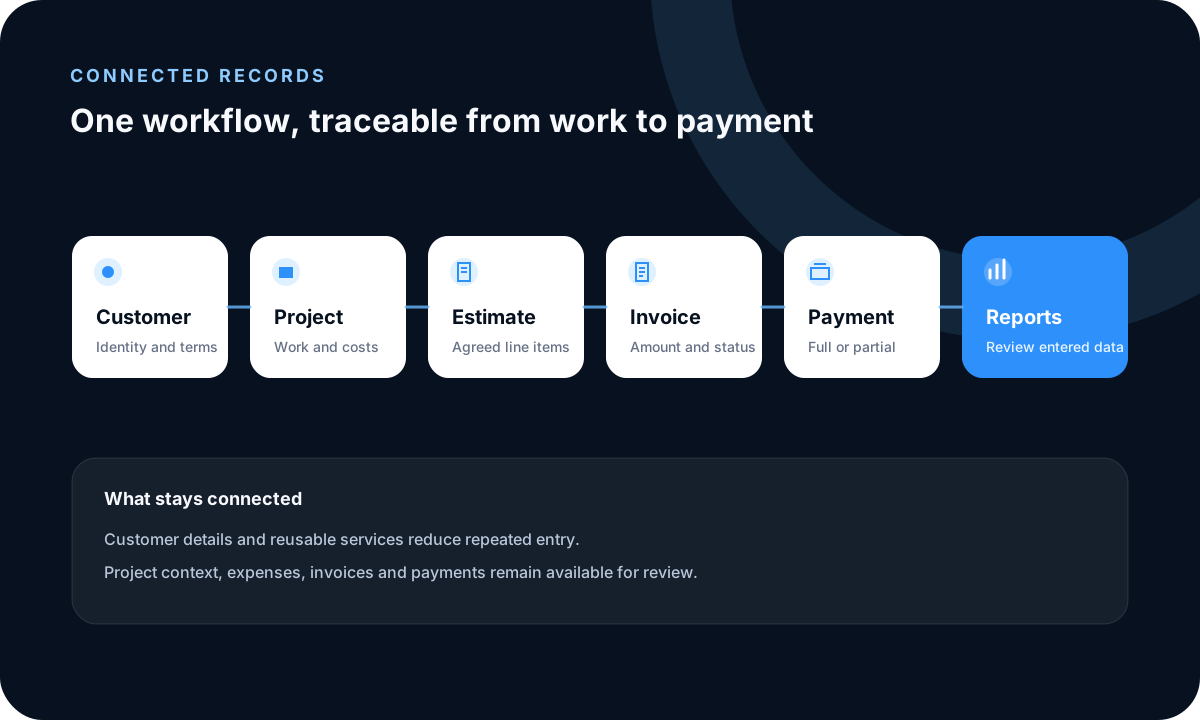
Choose invoicing software around the full workflow
The best fit depends on how work is agreed, delivered, billed and paid. Compare customer and project context, estimate conversion, partial payments, business expense tracking, reports and local document requirements rather than invoice design alone.
Freelance invoice software comparison — reviewed October 7, 2026
FollowIncome connects optional projects, estimates, itemized invoices and PDFs, full or partial payments, expenses and reports. A typical standalone invoice generator focuses on creating a document; saved history, estimate conversion, payment tracking and expense features vary by product.
Account and pricing comparison
FollowIncome requires a free verified account to protect saved business records. A limited number of current registrations receive lifetime-free access with no subscription or credit card required. Some standalone generators allow one-off creation without an account, while others require sign-up or limit free exports, branding or saved documents.
Explicit limitations
FollowIncome does not reconcile bank accounts or replace accounting, tax, legal or financial advice. Document-first generators may not connect delivery work, costs, payments and reporting. The comparison describes workflow types rather than every product, so check a provider’s current features directly.
Start with reliable customer context
Create the customer once and review the identity, contacts, billing details and addresses before using them in a document. Reusable items and services can reduce repeated entry, but the active company, customer, currency, tax treatment and document settings still need review.
Move from agreed scope to billing
Prepare an estimate when the client needs proposed scope and pricing, then convert accepted work into an invoice without rebuilding every line item. Confirm final quantities, dates, numbering, taxes, discounts, payment instructions and any scope changes before sending it.
Record payment progress separately
Apply supported full or partial payments to the relevant invoice so the paid and outstanding amounts remain distinguishable. A manually recorded payment is an operational entry, not independent proof that a bank or payment provider settled the funds.
Handle repeat work without assuming recurring billing
Reuse customer, item and service details where appropriate, then review every new invoice, date, line item, tax treatment, currency and payment instruction. FollowIncome does not currently claim automatic recurring invoice creation or subscription billing.
Example and limits
A freelance designer can connect one client to a project, estimate, converted invoice, deposit, final payment and project expenses. FollowIncome organizes those records, but it does not reconcile a bank account or replace accounting, tax, legal or financial advice.
FollowIncome vs a typical standalone invoice generator
Reviewed October 7, 2026. Individual generators vary; verify a provider’s current features directly.
| Capability | FollowIncome | Typical standalone generator |
|---|---|---|
| Connected projects | Optional projects connect delivery tasks, costs and files to customer and billing records. | Usually creates the document without an ongoing project record. |
| Estimates | Create an estimate and convert its line items into an invoice after review. | Estimate creation and conversion vary by product. |
| Invoices | Create itemized invoices, generate PDFs and retain them in the company workspace. | Creates an invoice or PDF; saved history varies. |
| Partial payments | Record full or partial payments and review the remaining invoice balance. | Payment tracking varies and may happen outside the generator. |
| Expenses | Record business or project expenses alongside billing records and reports. | Usually outside a document-only workflow. |
| Account requirement | A free verified account is required to protect saved business records. | Some allow one-off creation; others require an account to save. |
| Current pricing | A limited number of current registrations receive lifetime-free access with no subscription or credit card required. | Varies by provider, usage limits and paid features. |
| Limitations | Not bank reconciliation or a replacement for accounting, tax, legal or financial advice. | May not connect delivery, costs, payments and reporting. |
Connect the client, delivery and payment trail with a simple CRM for freelancers.
Related guides and tools
Freelance rates, invoices, and client management
Set a sustainable rate and connect it to estimates, invoices, payments, and client records.
Frequently asked questions
How does FollowIncome compare with a standalone invoice generator?
FollowIncome connects clients, optional projects, estimates, invoices, partial payments, expenses and reports. A standalone generator commonly focuses on creating a document, although exact features vary by product.
Is FollowIncome free invoicing software for freelancers?
Yes. A limited number of current registrations receive lifetime-free FollowIncome access without a subscription or credit card. Future paid plans apply to registrations made after the offer closes.
What should a freelancer look for in invoicing software?
Check whether the software fits the complete workflow: customer details, estimates, projects, invoices, partial payments, expenses, exports and the document requirements that apply to the business.
Can FollowIncome create an invoice without a project?
The workspace supports customer and document records directly; use a project when tasks, costs or delivery context need to stay connected to the billing workflow.
Can an estimate become an invoice?
Yes. An estimate can be converted so agreed line items do not need to be recreated from scratch. Review the converted invoice before sending it.
Does FollowIncome create recurring invoices automatically?
No automatic recurring-invoice or subscription-billing workflow is currently claimed. Reuse customer, item and service details where appropriate, then review each new invoice before sending it.
Does FollowIncome reconcile my bank account?
No. Payment records reflect information entered or returned by a configured workflow and should be checked against the relevant provider or bank record.
Is FollowIncome accounting software?
FollowIncome manages operational finance records and reports. It does not replace professional accounting, tax, legal or financial advice.
Read practical guides, explore all features or create a free account.